Assistant
The Assistant button, top right, opens a panel on the side of each screen. Ask a question about what you see: a dataset, visualizations, an imaging exam, a report.
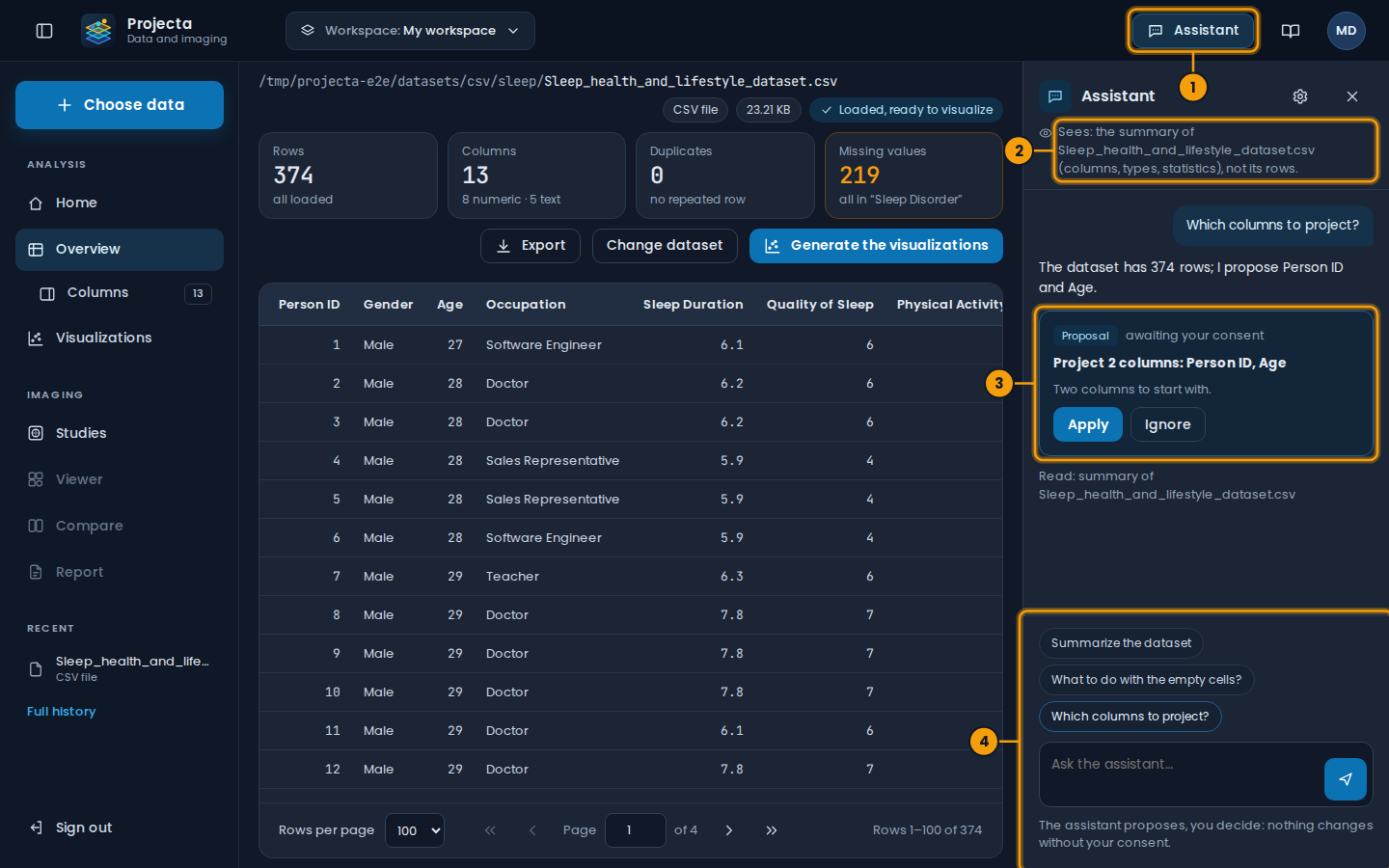
- The Assistant button.
- What it sees of the open screen.
- A proposal: Apply or Ignore.
- Ready-made questions, and yours.
It proposes, you decide
The assistant changes nothing by itself. When it suggests a setting, it shows it as a proposal, with Apply and Ignore:
| Proposal | What “Apply” does |
|---|---|
| Columns to project | chooses them for the visualizations, which are computed again |
| Empty cells | fills the given columns (mean, median, value) |
| 2D view, 3D view or both | changes how the visualizations are shown |
| Draft of a report | inserts it in the section (indication, technique, results); read it again, then save |
It can neither export, nor delete, nor validate. It never writes the conclusion of a report: the diagnosis remains the physician’s.
When the dashboard is in English, the assistant answers in English.
What it sees
At the top of the panel, a line says what the assistant sees of the open screen. By default:
- the summary of the dataset on screen (columns, types, statistics, empty cells), not its rows;
- for an exam: its code (anonymized), its information and your measurements, never the images nor the identity of the patient.
Settings and log
The cog of the panel opens the settings of the workspace:
- turn the assistant on or off in this workspace;
- allow it to read 20 sample rows (off by default);
- allow it to propose settings, to write drafts.
The log lists, for 30 days, each question, each reading, each proposal and what you did with it. CSV downloads it.
Answers to check
The assistant is a language model (Claude, by Anthropic): it can be wrong. Check the figures it quotes and read its drafts again. Your questions and the summary of the data are sent to this model by the Projecta server.